Search by Name
Search by Survey Number
Search by Document No.
Free, No Login Needed
What is IGRS AP Property Search?
IGRS AP Property Search is a free online service available through the official Andhra Pradesh Registration and Stamps Department portal at registration.ap.gov.in. It allows any citizen to search for registered property documents in Andhra Pradesh using multiple identifiers including the owner’s name, survey number, document number, or house and door number.
This service is especially useful for buyers who want to verify ownership before purchasing land, lawyers conducting title searches, banks verifying property records before loan approval, and property owners who need to confirm their registered document details without visiting a Sub-Registrar Office (SRO).
The portal’s e-Search feature gives access to the CARD (Computer-aided Administration of Registration Department) database which holds digitized records of all properties registered in Andhra Pradesh primarily from 1983 onwards. No login or registration is required to use the basic search functions.
Important Notice: Property search results show registered document records from the CARD system. Documents registered before 1983 may not appear in the online database. For older records, a manual search at the relevant SRO is required.
Four Ways to Search Property on IGRS AP Portal
The IGRS AP portal offers four different search methods depending on what information you have available:
1. Search by Party Name (Owner Name)
Search registered documents by entering the buyer or seller name as it appears on the registration deed. This is the most commonly used search method when you know the owner’s name but do not have the document number. Results show all transactions linked to that name within the selected SRO and time period.
2. Search by Survey Number
Search using the land survey number assigned in the revenue records. This method is most reliable for agricultural and rural properties where the survey number is the primary land identifier. Selecting the correct district, mandal, and village is required before entering the survey number.
3. Search by Document Number
Search using the unique registration document number assigned at the time of deed execution. This gives the most precise and instant results as each document number maps to exactly one registered deed in the SRO database. You also need to know the year of registration and the SRO name to complete this search.
4. Search by House or Door Number
Search using the municipal door number or house number for urban properties such as apartments and independent houses. This is the preferred method for city properties in Vijayawada, Visakhapatnam, Tirupati, and other AP urban centres where survey numbers may not be the primary identifier on the title deed.
How to Search Property by Name on IGRS AP Portal
Follow these steps to search a registered property document using the owner or party name on the official portal:
Visit the Official IGRS AP Portal
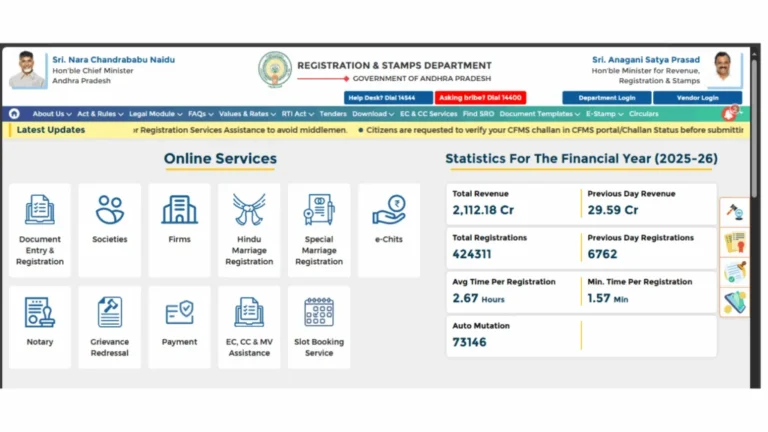
Open your browser and navigate to registration.ap.gov.in. No login is required for the basic e-Search or EC search service. The portal is accessible 24 hours a day.
Click on EC, CC and MV Assistance
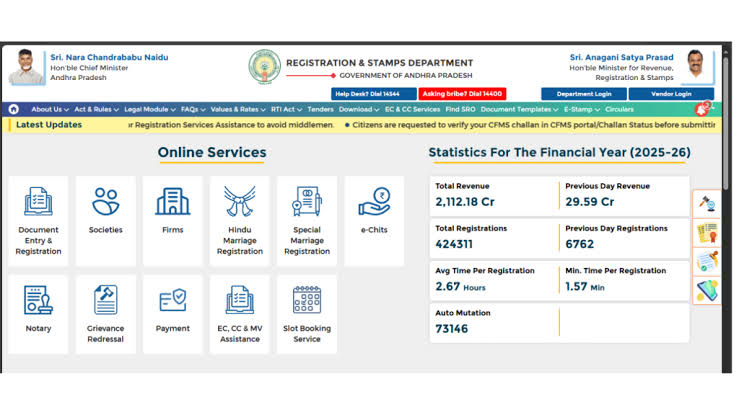
On the homepage, locate the Online Services section and click on EC, CC and MV Assistance. This takes you to the service landing page where EC search and document search options are available.
Select EC for Information Only
On the EC and CC Service page, click on EC for Information Only. This is the free, unsigned search option that does not require a login. It gives you full access to property transaction history and registered document details.
Choose Search Type as Party Name
In the EC search form, locate the Search Type dropdown and select Party Name. Then select your District, the relevant SRO, and set the From Year and To Year for the period you want to search.
Enter the Owner or Party Name
Type the name exactly as it appears on the registered document. Even a small spelling variation can return no results. You can enter the first few characters to get partial matches. Complete the captcha verification and click Submit.
View Search Results
The portal displays a list of all registered documents matching the name within the selected SRO and time period. Each result shows the document number, registration date, document type, party names, and property description. Click on any result to view full transaction details.
How to Search Property by Survey Number on IGRS AP
Survey number search is the most reliable method for verifying agricultural or rural land in Andhra Pradesh. Here is how to do it:
Go to EC for Information Only
Follow the same path: registration.ap.gov.in, then EC, CC and MV Assistance, then EC for Information Only.
Select Survey Number as Search Type
From the Search Type dropdown, select Survey Number. Then choose the District, Mandal, and Village from the respective dropdown fields. Setting these three location fields correctly is critical to getting accurate results.
Enter the Exact Survey Number
Enter the survey number exactly as it appears in your sale deed or Adangal record including any sub-division numbers. Set the search period using From Year and To Year fields. For a complete ownership history, set the From Year to at least 30 years back.
Submit and View Transaction History
Complete the captcha and click Submit. The system returns all registered transactions for that survey number including sale deeds, mortgage deeds, gift deeds, and release deeds. Each entry shows document number, date, parties involved, and type of transaction.
What Information Does IGRS AP Property Search Show?
A successful property search on the IGRS AP portal returns the following details for each matching registered document:
- Document Number and Year – The unique registration number assigned at the SRO along with the year of registration.
- Document Type – Whether the registered deed is a sale deed, gift deed, mortgage deed, partition deed, release deed, or agreement of sale.
- Party Names – Names of the buyer (executant) and seller (claimant) as recorded in the CARD system.
- Property Description – Survey number, village, mandal, district, and area details as entered during registration.
- Registration Date – The exact date the document was executed and registered at the SRO.
- SRO Name – The Sub-Registrar Office where the document is stored and accessible for physical verification.
Common Search Issues and How to Fix Them
The name in the CARD database may be spelled differently from what you entered. Try searching with only the first name or the first few characters. Also confirm you have selected the correct SRO, as a property registered in a different SRO jurisdiction will not appear in your current search.
This typically happens when the survey number has sub-divisions that need to be entered separately. Verify the exact survey sub-division number from your Adangal or 1-B record. For properties registered before 1983, online records will not be available and you must visit the SRO directly.
Common names like Ravi Kumar or Lakshmi may return hundreds of results. Narrow down the search by setting a specific year range or cross-referencing with the document type you are looking for such as sale deed or mortgage deed to identify the exact record.
Each SRO has jurisdiction over a specific geographic area. If you are unsure which SRO covers the property location, check your sale agreement or tax receipts for the SRO name. You may need to repeat the search under different SROs for the same district until the record is found.
📚 Related Guides You May Find Helpful
- EC Online AP 2026 – Download a digitally signed Encumbrance Certificate after verifying property details through search.
- IGRS AP Prohibited Properties 2026 – Always verify prohibited status alongside the property search before making any payment.
- IGRS AP Market Value 2026 – Check the government fixed land rate for any village or district in AP.
- IGRS AP Certified Copy 2026 – Get an official certified copy of any registered document once you have the document number from your search.
Frequently Asked Questions
Summary
The IGRS AP Property Search service is one of the most powerful free tools available to property buyers and owners in Andhra Pradesh. Whether you need to search by owner name, survey number, document number, or door number, the official portal at registration.ap.gov.in provides instant access to the state’s complete property registration database. Always pair the search result with an Encumbrance Certificate and a Prohibited Properties check before finalizing any property transaction to ensure complete legal safety.