Track Signed EC
Often Instant–24 Hrs
SMS / Email Alert
SRO Track: 7–15 Days
What Does EC Status Check AP Actually Mean?
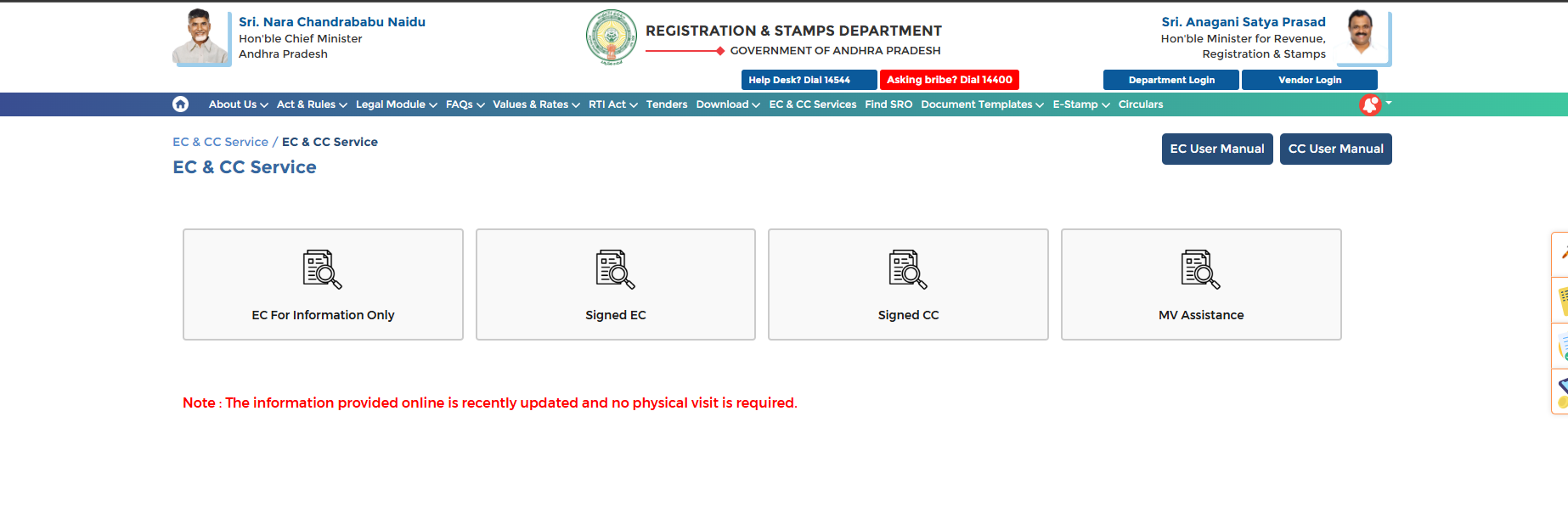
There are two very different EC services on the Andhra Pradesh Registration and Stamps Department portal at registration.ap.gov.in, and if you’re trying to perform an EC Status Check AP, it’s important to understand that the concept of “status” applies differently to each service.
- EC for Information Only – This is an instant search, not an application. Results appear on screen the moment you submit the form, so there is no “status” to track separately.
- Signed EC – This requires a CARD PRIMME login and a government fee. After you submit the request, it goes through a processing step before the digitally signed PDF is ready. This is the application whose status citizens usually want to check.
How to Check Your Signed EC Application Status Online
Log In With Your Registered Account
Go to registration.ap.gov.in and log in using the mobile number or email you registered with on the CARD PRIMME system. If you do not have an account yet, you will need to create one before you can apply for or track a Signed EC.
Open the Signed EC Section
From your dashboard, go to EC and CC Services and select Signed EC. After logging in, this section lists every EC request you have ever submitted, each showing its current status alongside it.
Locate Your Application in the List
Match the entry using the property details or the date you applied. The status field next to it tells you whether the certificate is still being processed or is ready for download.
Download Once Marked Ready
Once your certificate is generated, you will typically also get an SMS or email alert on your registered contact details. Use the Download option next to the entry to save your digitally signed PDF.
How Long Does an EC Application Take?
| Application Type | Typical Turnaround |
|---|---|
| EC for Information Only | Instant on-screen result |
| Signed EC (online, after fee payment) | Usually within minutes to 24 hours |
| EC applied offline at the SRO | Typically 7 to 15 working days |
Turnaround can vary depending on SRO workload and whether the property record needs manual verification. If your online status has not updated after 24 hours, treat it as a delay worth following up on rather than the norm.
If You Applied Offline at the SRO
When you submit an EC application in person at the Sub-Registrar Office, you receive an acknowledgment receipt with a reference number. There is no public online tracker for this offline route, so to check progress:
- Keep your acknowledgment receipt and reference number safe – you will need to quote it for any follow-up.
- Contact the same SRO where you submitted the application, either by phone or in person, after the stated 7 to 15 working day window.
- Visit on the date mentioned on your receipt to collect the physical certificate if the SRO does not notify you first.
Understanding Your Result: Form 15 vs Form 16
Once your EC status shows as completed, the certificate itself will be issued in one of two forms:
Form 15 – Encumbered
Issued when the property has one or more registered transactions – such as a sale, mortgage, or gift deed – within your chosen search period.
Form 16 – Nil Encumbrance
Confirms that no transactions were recorded for the property during the queried period. This is the version banks generally ask for before approving a home loan.
Common Status-Check Problems and Fixes
Make sure you are logged in with the same mobile number or email used at the time of application. If you created a new account by mistake, the old application will not appear under it.
This can happen if the payment confirmation was delayed or the property record needs manual cross-checking by the SRO. Note your transaction reference and contact the concerned SRO if there is no update after a full working day.
Keep your bank or UPI transaction reference ready. If the amount was debited but no application appears in your dashboard within a few hours, report the transaction ID to the SRO or the portal helpdesk for reconciliation rather than re-submitting payment.
📚 Related Guides You May Find Helpful
- EC Online AP 2026 – Full guide to searching and applying for an EC.
- EC Download Andhra Pradesh – Step-by-step search by survey number.
- IGRS AP Login – Create or recover your portal account before applying.
- IGRS AP Market Value 2026 – Check the guideline rate before you register your property.
Frequently Asked Questions
Summary
Checking your EC status in Andhra Pradesh comes down to where you applied. For an online Signed EC, log in to registration.ap.gov.in and check your application list under Signed EC. For an offline SRO application, follow up using your acknowledgment reference number. Either way, keep your transaction details handy so any delay can be resolved quickly.