Completely Free
Instant Results
Works on Mobile
No Office Visit
What is EC Online in Andhra Pradesh?
If you are buying property in Andhra Pradesh, getting a home loan, or just checking if a property is legally clear, the first thing you need is an EC. EC stands for Encumbrance Certificate and it shows every registered transaction that has happened on a property. This includes sales, mortgages, gift deeds, court orders and anything else that was officially registered.
Earlier, getting an EC in AP meant going to the sub-registrar office, standing in long queues, and waiting for days. That changed completely after the IGRS AP portal was launched. Now you can get your EC online within minutes, sitting anywhere, without spending a single rupee.
The official portal for AP EC online is registration.ap.gov.in. This is the Government of Andhra Pradesh Registration and Stamps Department portal, commonly known as IGRS AP.
Who Needs EC Online in AP?
- Anyone planning to buy land or property in Andhra Pradesh
- People applying for home loans where the bank asks for EC
- Sellers who want to show buyers their property is free from dues
- Lawyers handling property cases or inheritance matters
- People applying for PMAY or other government housing schemes
- Anyone who wants to verify property ownership history
What You Need Before Checking EC Online AP
Keep these details ready before you open the portal. Having them at hand saves time and avoids confusion during the search.
- District where the property is located
- Mandal name
- Village name
- Survey number of the property
- Time period for which you need EC (from year to current year)
How to Search EC Online in AP — Step by Step
Open the IGRS AP Official Portal
Go to registration.ap.gov.in in your browser. This is the only official portal for Andhra Pradesh property registration and EC services. There are several third party websites that look similar, so always verify the URL before entering any details.
Find the EC and CC Services Section
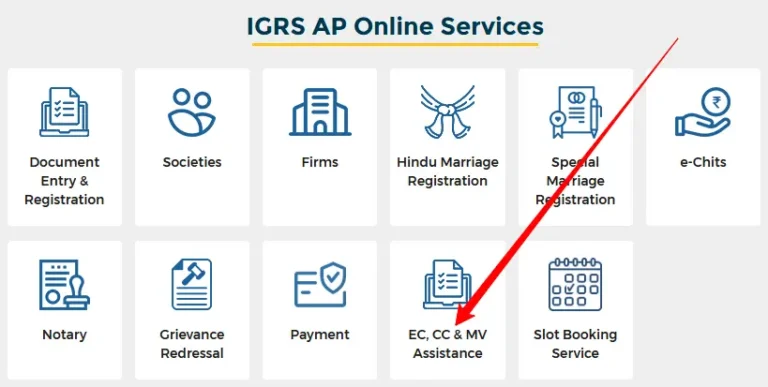
On the homepage look for the EC and CC Services option in the top navigation menu. Hover over it and a dropdown will appear. Click on Search EC or EC Online Search to go to the search page.
Visit Search EC Page : — https://registration.ap.gov.in/igrs/EClandingPage
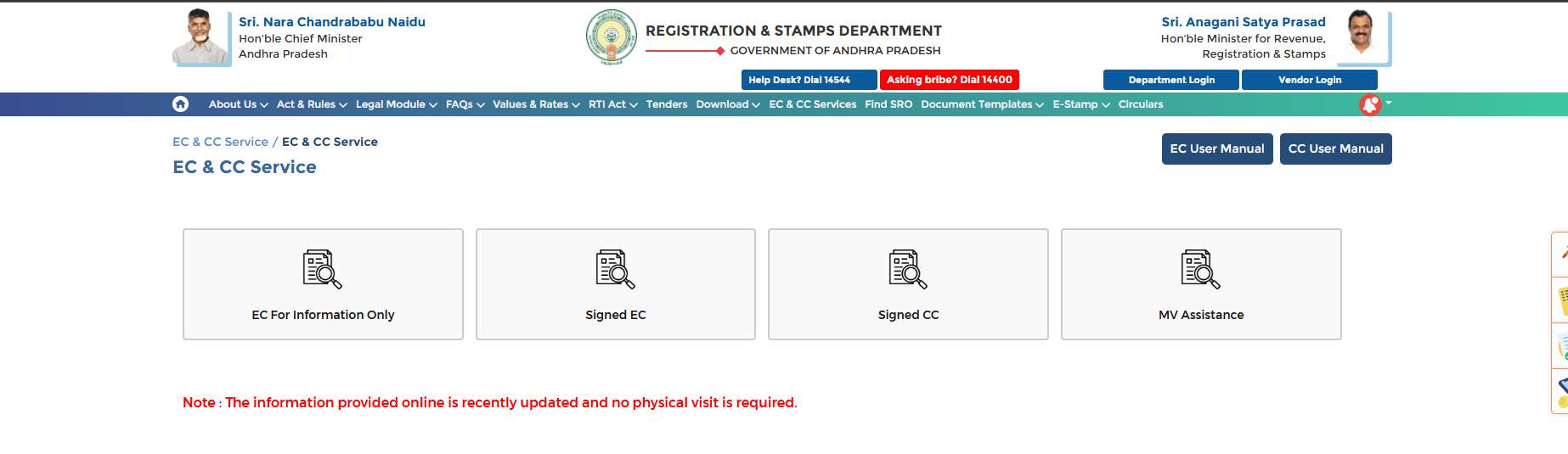 EC Online AP 2026 – View and Download Encumbrance Certificate on IGRS Andhra Pradesh Portal
Visit EC Search Page : — https://registration.ec.ap.gov.in/ecSearch
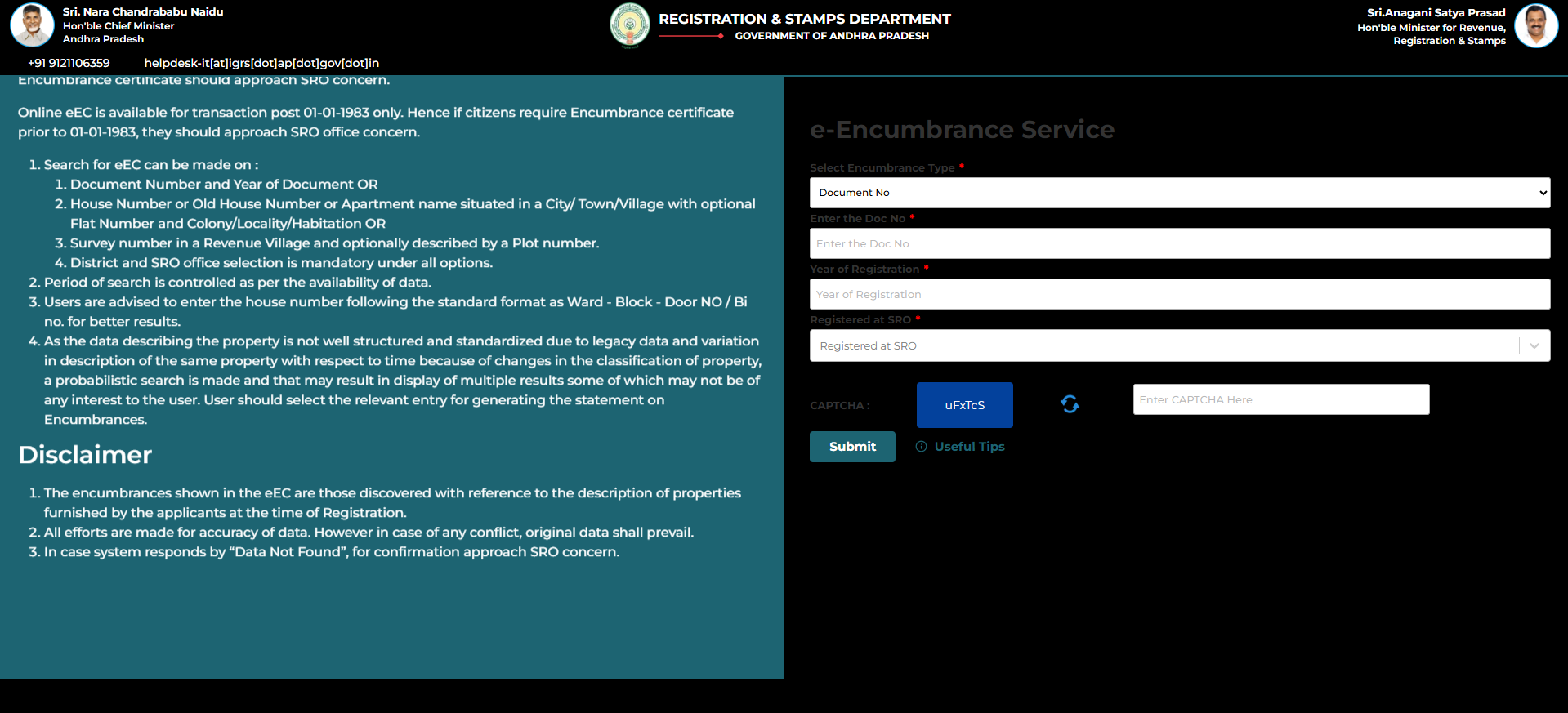
Visit EC Search
Select Your Search Type
The portal gives you two ways to search for EC:
By Property Details
Use when you have survey number and village details
By Document Number
Use when you have the registration document number
Fill in the Property Details
If you chose Property Details search, fill in the form carefully:
| Field | What to Enter |
|---|---|
| District | Select your property district |
| Mandal | Select the mandal |
| Village | Select the village name |
| Survey Number | Enter from property documents |
| Period | From year to current year |
Submit and View EC Online
Click the Submit or Search button. The portal will display the EC details for your property. You will see owner names, transaction types, document numbers, and registration dates for the selected period.
Download EC as PDF
Once EC details appear on screen, click Download or Print to save a copy. The downloaded EC is a valid document for submitting to banks and legal proceedings. If the download does not open, allow popups for the portal in your browser settings.
What the EC Online AP Shows You
The EC you view on the IGRS AP portal gives you a complete picture of the property’s legal history. Here is what you will find in the results:
| Information | What It Means |
|---|---|
| Owner Name | Who owned the property and when |
| Transaction Type | Sale, mortgage, gift deed, partition, court order etc. |
| Document Number | Official registration number for each transaction |
| Registration Date | Date when the document was officially registered |
| Consideration Amount | Value declared at the time of registration |
| Nil Encumbrance | Property has no pending loans or legal dues |
Free EC vs Paid EC in Andhra Pradesh
A lot of people are confused about whether EC online AP is free or paid. Here is a clear breakdown:
| Type | Computer EC | Signed EC |
|---|---|---|
| Cost | Free | Small Fee |
| Login Required | No | Yes |
| Digitally Signed | No | Yes |
| Bank Accepted | For reference | Yes |
| Office Page fee | No | Yes |
Important: If you need EC for bank loan or court submission, always get the digitally signed EC from the IGRS AP portal. The free computer EC is good for personal verification but may not be accepted for official submissions by all institutions.
Common Problems While Checking EC Online AP
📚 Related Guides You May Find Helpful
- IGRS AP Market Value Check 2026 – Find the government fixed land value for any area in Andhra Pradesh.
- IGRS AP Login and Registration Guide – Create your free account to access signed EC and other services.
- IGRS AP Official Portal – Visit the official Andhra Pradesh Registration and Stamps Department portal.
Frequently Asked Questions
Conclusion
Checking EC online in Andhra Pradesh has never been easier. The IGRS AP portal gives you access to property records from anywhere, at any time, without any cost for basic search. Whether you are buying property, applying for a loan, or just verifying ownership, this tool gives you all the information you need in minutes. For any portal related issues contact the IGRS AP helpdesk directly.
[…] EC Online AP 2026 — Search and download Encumbrance Certificate on the IGRS AP portal for free. […]
[…] services like searching an EC online in AP or viewing market value do not require a login. However, for important services like downloading a […]
[…] EC Search — Search and view the Encumbrance Certificate for any property in AP by entering district, SRO, village, and survey number. Full EC search guide here. […]
[…] Encumbrance Certificate — Recent EC for the property being registered. Get EC online here. […]