IGRS AP Online: EC View, EC Search, Encumbrance Certificate and Market Value 2026
Access the official IGRS AP online services to search Encumbrance Certificates (EC), check market values, verify prohibited properties, calculate stamp duty, and complete property registration-related tasks through the Andhra Pradesh Registration Department.
IGRS AP (Integrated Grievance Redressal System) is the official Andhra Pradesh Registration Department portal for property-related online services. Citizens can search Encumbrance Certificates (EC), check market values, verify prohibited properties, calculate stamp duty, and access registration services from one place.
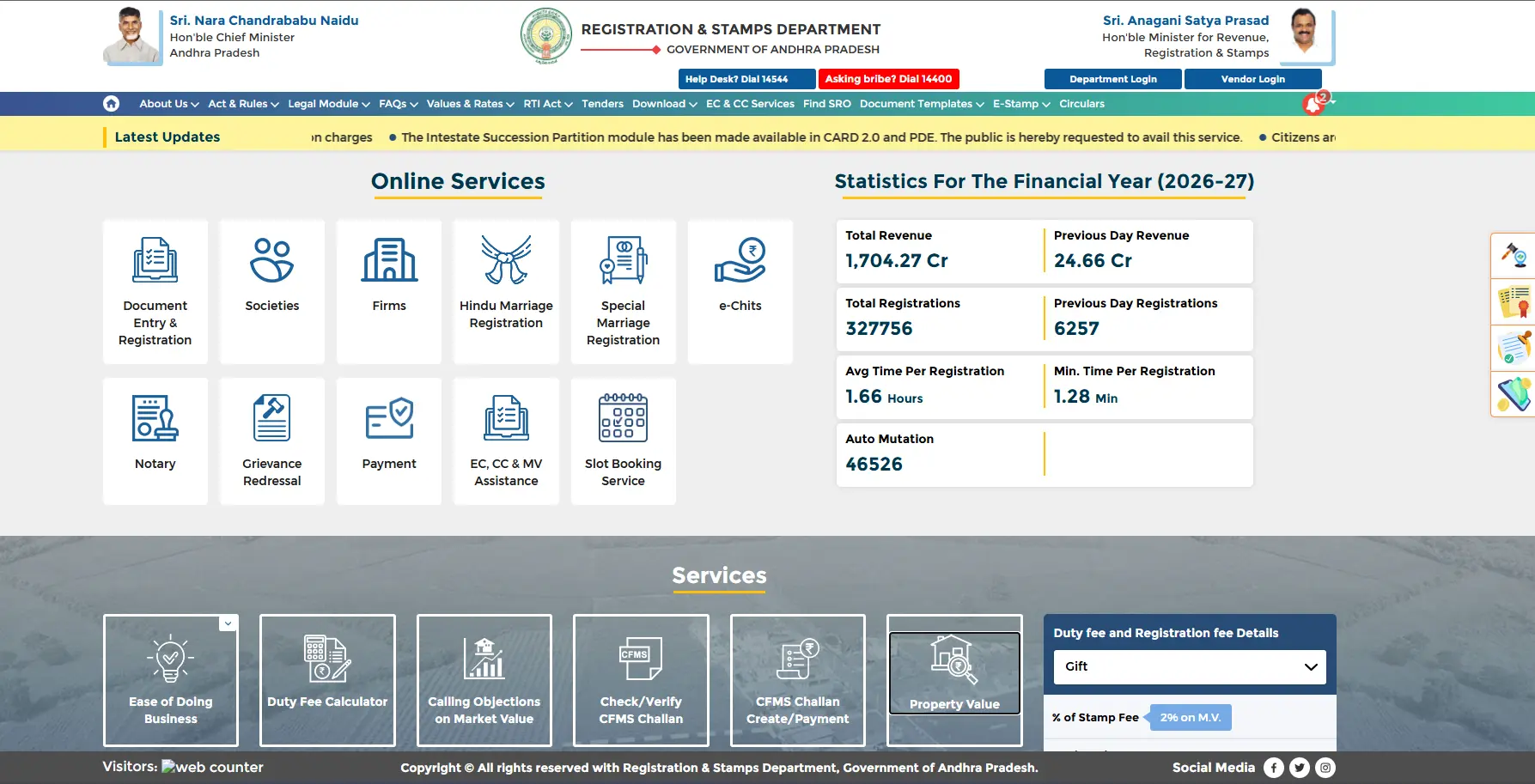
This guide explains every important IGRS AP online service with simple step-by-step instructions. Follow the sections below to search EC records, view market values, download certificates, and complete other property-related services through the official portal.
⚠️ Important Notice : – Always use the official Andhra Pradesh Registration Department website. Never share your personal details on unofficial or third-party websites.
| Portal Name | IGRS AP, AP Registration and Stamps Department |
| Official Website | registration.ap.gov.in/igrs |
| EC Online (Free) | No login required, available instantly |
| Signed EC | Login required, government fee applicable |
| Market Value Check | Free, available online |
| Helpline | 14400 (Toll Free) |
| helpdesk-it@igrs.ap.gov.in | |
| Phone | +91 9121106359 |
IGRS AP Online Services
The IGRS AP EC Online service allows citizens to search and download Encumbrance Certificates (EC) online through the official Andhra Pradesh Registration Department portal. It helps verify property ownership, transaction history, legal status, and financial liabilities before buying, selling, or applying for a loan.
What You Can Do with EC Online:
- Check whether a property has any registered loans or mortgages.
- Verify previous ownership records and transaction history.
- Identify legal disputes or registered claims, if available.
- Download available EC certificates online.
- Access both signed and unsigned EC services through the official portal.
- Verify property details securely without visiting the Sub-Registrar Office.
The EC Online service makes property verification faster and more convenient by providing essential property records online. Always use the official IGRS AP portal to ensure accurate information and secure access to government services.
Important: An Encumbrance Certificate reflects registered transactions only. For complete verification, always cross-check property details and supporting documents before completing any property transaction.
How to Do EC Search on IGRS AP
You can search and verify Encumbrance Certificate (EC) records online through the official IGRS AP e-Encumbrance portal. The service allows users to search property records using different search methods based on the information available.
Official EC Search Portal:
👉 https://registration.ec.ap.gov.in/ecSearch
What You Can Do with EC Online:
- Visit the official IGRS AP EC Search portal.
- Select your preferred EC Search option.
- Enter the required property or registration details accurately.
- Choose the appropriate search method (Document Number, Survey Number, Owner Name, or Property Address).
- Complete the captcha verification and submit your request.
- Review the EC search results displayed on the screen.
- Download or print the EC report for future reference, if available.
Important: An Encumbrance Certificate reflects registered transactions only. For complete verification, always cross-check property details and supporting documents before completing any property transaction.
EC Search Methods Available
Depending on the details you have, you can search EC records using any of the following methods:
- Document Number – Search using the registered document details.
- Survey Number – Find property records based on the survey number.
- Owner Name – Search properties registered under a person’s name.
- Property Address – Locate records using the complete property address.
Important: Enter the information exactly as recorded in the registration documents to improve search accuracy. If no records are found, verify the entered details and try again using another available search method.
Viewing & Downloading Your EC Certificate
After completing an EC Search, you can instantly view the available Encumbrance Certificate (EC) online and download it for reference or official use, depending on the certificate type.
What You'll Find in an EC Record
The EC report may include the following property details:
- Sale and purchase transaction history.
- Registered loans, mortgages, or financial liabilities (if any).
- Ownership transfer records and previous registrations.
- Registered legal claims or encumbrances, where applicable.
- Complete transaction history for the selected property during the chosen period.
Choose the Right EC Certificate
Unsigned EC (For Information Only)
- Available online without a digital signature.
- Suitable for basic property verification and reference.
- Cannot be used for legal, banking, or official registration purposes.
Signed EC (Official Certificate)
- Digitally signed and issued by the Andhra Pradesh Registration Department.
- Accepted for property registration, bank loans, and other official purposes.
- Available after login through the official IGRS AP portal.
Access Signed EC:
👉 https://cardprimme.rs.ap.gov.in/PDE/ECLoginPage
Important: Always download the appropriate EC certificate based on your requirement. For legal or official work, use only the digitally signed EC issued through the official Andhra Pradesh Registration Department portal.
Market Value (Basic Rate) Search
The IGRS AP Market Value service allows citizens to check the government-approved basic property rates for land, plots, houses, and other registered properties in Andhra Pradesh. These official values help estimate property costs before registration or purchase.
IGRS AP Market Value: How to Check Land Value Online
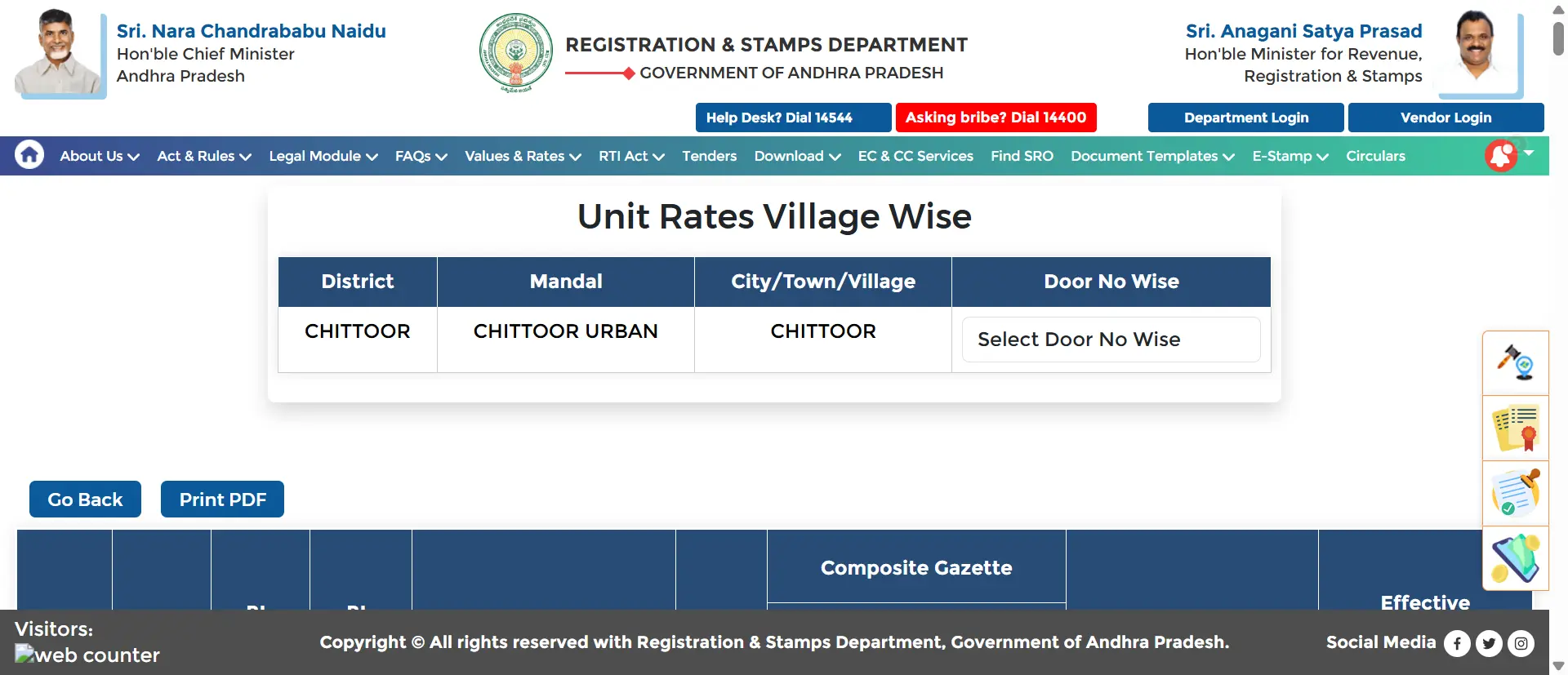
Market Value, also called Basic Rate, is the minimum government-fixed price for land and property in Andhra Pradesh. Stamp duty is calculated on whichever is higher between the actual sale price and the market value. You cannot register a property below its market value.
Stamp Duty in AP 2026: Stamp Duty 5% + Transfer Duty 1.5% + Registration Fee 1% = Total approximately 7.5% of property value, calculated on market value or sale price, whichever is higher.
Benefits of Checking the Official Market Value
- Find the latest government-approved property rates.
- Estimate stamp duty and registration charges more accurately.
- Avoid underpricing or overpricing during property transactions.
- Use official valuation details for bank loans and legal documentation.
How to Check Property Market Value
- Open the official IGRS AP portal.
- Select the Market Value Assistance service.
- Choose the required District, Mandal, Village, or Local Area.
- Enter the property details or survey number, if required.
- View the official Basic Rate (Market Value) instantly.
Important: The market value displayed on the portal is the government guideline value used for registration purposes. The actual market selling price of a property may differ depending on location, demand, and other market conditions.
AP Registration Fees & Stamp Duty Charges
The Government of Andhra Pradesh regulates specific stamp duty rates, registration costs, and associated user charges for different property instruments. Below are the structural rates calculated on the property market value or transactional values:
| Document Type | Stamp Duty | Registration Fee | User Charges |
|---|---|---|---|
| Sale Deed | 5% | 1% | Rs 100 (< Rs 50k value) / Rs 200 (> Rs 50k value) |
| Gift Deed | 2% | 0.5% (Min Rs 1,000 - Max Rs 10,000) | Rs 100 (< Rs 50k value) / Rs 200 (> Rs 50k value) |
| Settlement Deed | 2% | 0.5% | Rs 100 (< Rs 50k value) / Rs 200 (> Rs 50k value) |
| Partition Deed | 1% | Rs 1,000 flat | Rs 100 (< Rs 50k value) / Rs 200 (> Rs 50k value) |
| Mortgage with Possession | 2% | 0.10% | Rs 100 |
| Mortgage without Possession | 0.50% | 0.10% | Rs 100 |
| Agreement of Sale-cum-GPA | 5% | Rs 2,000 flat | Rs 100 (< Rs 50k value) / Rs 200 (> Rs 50k value) |
Documents Required for Property Registration
To successfully register real estate documentation or transfer ownership parameters via the IGRS AP framework, ensure you possess the following critical evidentiary files:
- Original executed Sale Agreement and verified Draft Sale Deed
- Latest Encumbrance Certificate (EC) downloaded from the official portal
- Valid Identity Proofs of the buyer, the seller, and at least two active witnesses (Aadhaar, Voter ID, or Passport)
- Duly filled Form 60 or explicit PAN Card copies with authentic address verification tags
- Recent Passport-size photographs mapping both transacting parties
- Copy of local utility bills to corroborate absolute spatial and property specifications
How to Get Digitally Signed EC on IGRS AP
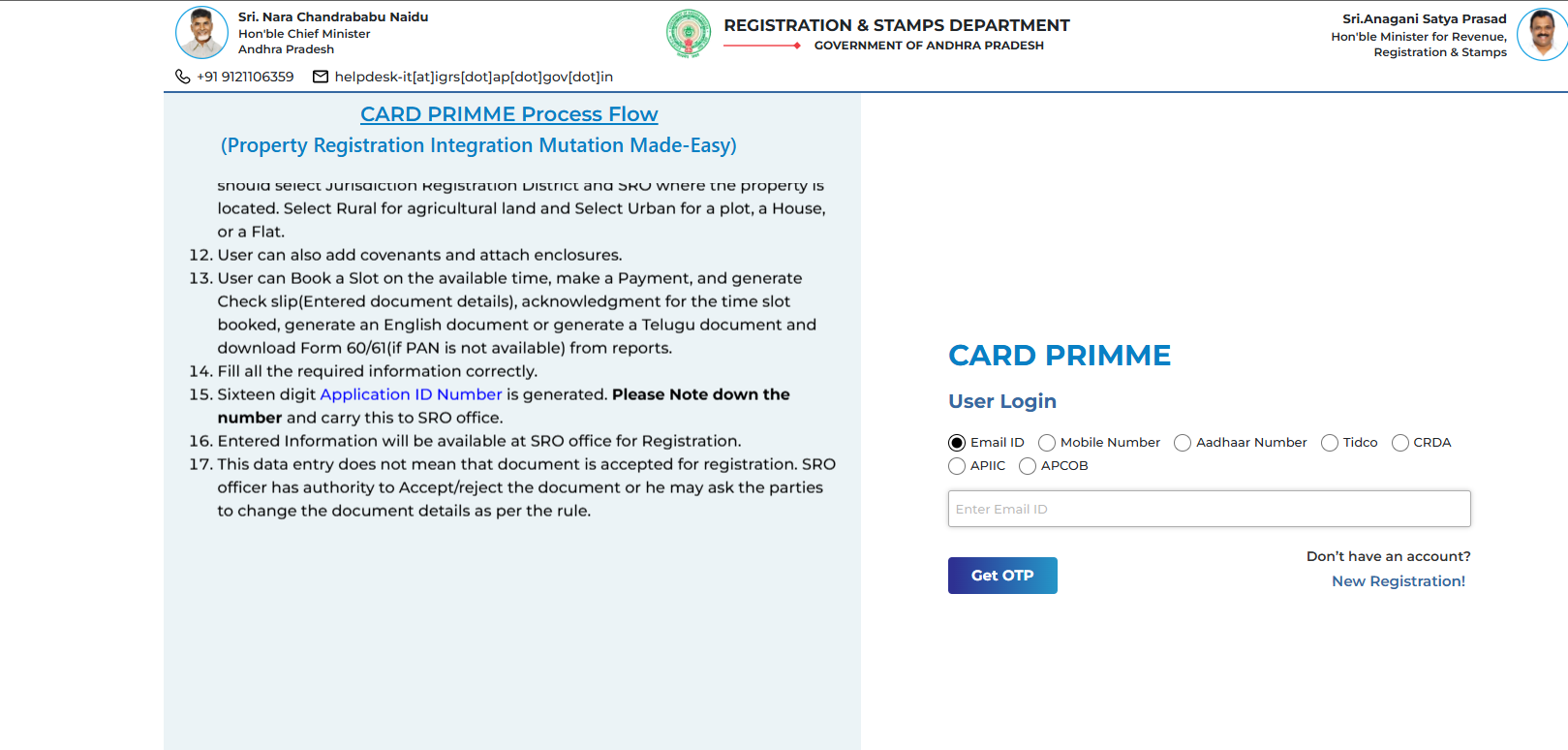
The digitally signed EC is the official certificate that banks, courts, and government offices accept. It is issued through the CARD PRIMME portal which is the official system for signed certificates in Andhra Pradesh.
| Feature | Free Unsigned EC | Digitally Signed EC |
|---|---|---|
| Cost | Free | Government fee applies |
| Login Required | No | Yes |
| Digital Signature | No | Yes |
| Valid for Bank Loan | No | Yes |
| Valid for Court Use | No | Yes |
| Download Time | Instant | After processing |
Step by Step: How to Get Signed EC on IGRS AP
- Open the official CARD PRIMME portal:
cardprimme.rs.ap.gov.in/PDE/ECLoginPage. - Select your preferred login method (Email ID, Mobile Number, Aadhaar, TIDCO, CRDA, APIIC, or APCOB).
- Enter your registered Email ID or Mobile Number and click Get OTP.
- Verify the OTP. If you’re a new user, complete the New Registration process first.
- After logging in, choose the EC Application service.
- Enter the required property details, including District, SRO, Village, and Survey Number.
- Select the required EC period, review the entered information, and submit your application.
- Pay the applicable government fee using the available online payment options.
- Once the application is processed, log in again and download your Digitally Signed EC (PDF) for official use.
IGRS AP Prohibited Properties: Check Before Buying
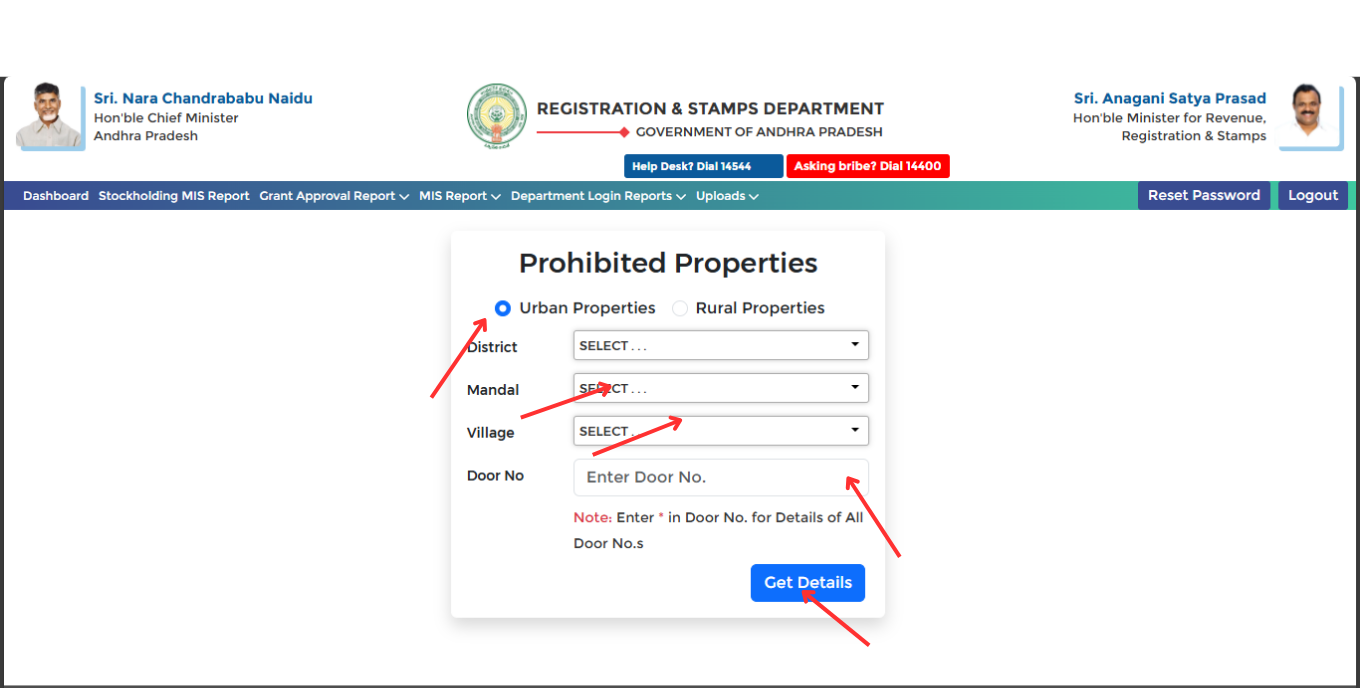
Prohibited Properties are properties that cannot be registered or transferred due to government acquisition, court orders, or legal disputes. Purchasing a prohibited property can result in a legally invalid transaction. Always verify before making any advance payment.
Types of Prohibited Properties in AP:
- Government land or land under acquisition proceedings
- Properties with active court attachment orders
- Land in forest reserve areas or eco-sensitive zones
- Properties under the Benami Transactions Act
- Land under Urban Land Ceiling or other government schemes
- Properties with disputed ownership or active fraud cases
Where to Find It: The Prohibited Properties list for Andhra Pradesh is maintained separately. You can check it on our dedicated page or contact your local Sub-Registrar Office directly to verify if a specific survey number is under any restriction.
Important Points to Remember:
- A clean EC does not always mean the property is not prohibited. Always check the prohibited properties list separately.
- If a property appears in the prohibited list, the Sub-Registrar Office will refuse to register the sale deed.
- Always check both the EC and the prohibited properties status before paying any advance for a property deal.
Common Mistakes to Avoid on IGRS AP Portal

Avoid these mistakes for safe property transactions in Andhra Pradesh:
- Checking EC for only 5 to 10 years. Always check minimum 30 years to see the full ownership chain.
- Using unofficial or third-party websites instead of the official registration.ap.gov.in portal.
- Relying on the free unsigned EC for bank loan or court submissions. Only the digitally signed EC is accepted.
- Not checking the Prohibited Properties list before making any advance payment.
- Selecting the wrong District or SRO while searching, which leads to no results even if records exist.
- Ignoring mortgage or loan entries in EC. The property may still be pledged to a bank.
- Not verifying that the seller name in EC exactly matches the person selling the property.
- Skipping the Market Value check before registration, which may result in underpaying stamp duty.
Troubleshooting Common Issues
If you experience any problems while using the IGRS AP portal, try the solutions below before contacting the concerned department.
Unable to Access the IGRS AP Portal
- Check whether your internet connection is stable.
- Open the portal using the latest version of Chrome, Edge, or Firefox.
- Clear your browser cache and cookies, then reload the page.
- Temporarily disable any VPN or proxy service, if enabled.
- If the portal is busy, try accessing it again after some time.
EC Search Is Not Displaying Results
- Verify that all property or registration details are entered correctly.
- Double-check the document number, survey number, or owner details.
- Ensure the selected SRO, district, and registration year are correct.
- Try using another available search method if one does not return results.
- If the issue continues, contact the concerned registration office for assistance.
Payment Could Not Be Completed
- Check whether the payment amount has been deducted from your bank account.
- Wait for the payment status to update before making another attempt.
- Retry the payment using a different payment method or browser.
- Save the transaction ID or payment reference for future verification.
- If the amount is deducted but the application is not updated, contact your bank or the official support team.
Unable to Download the EC Certificate
Make sure a PDF reader is installed on your device.
- Allow pop-ups for the official IGRS AP website in your browser.
- Try downloading the certificate using another browser or device.
- For a better experience, use the desktop version of the portal.
- If the download still fails, contact the concerned Sub-Registrar Office (SRO).
Final Thoughts
The IGRS AP portal makes it easier to access essential property registration services online, including EC Search, EC View, Market Value Check, Prohibited Property Search, and Digitally Signed EC. By using the official Andhra Pradesh Registration Department portal, you can verify property records, check government-approved values, and complete important property-related tasks securely from anywhere.
Before making any property transaction, always verify the information through the official portal and keep your property documents updated. We regularly update this guide whenever new features or changes are introduced by the Andhra Pradesh Registration Department.
Disclaimer: This guide is provided for informational purposes only and is not affiliated with the Andhra Pradesh Registration Department. For the latest information and official services, always visit the official IGRS AP portal.
Frequently Asked Questions About IGRS AP
IGRS AP stands for Integrated Grievance Redressal System of Andhra Pradesh. It is the official property registration and verification portal of the AP government, available at registration.ap.gov.in.
The unsigned EC from the EC For Information Only section is completely free and does not require login. The digitally signed EC, which is needed for bank loans and court use, requires login and payment of a government fee through the CARD PRIMME portal.
A minimum of 13 years is legally required. However property experts strongly recommend checking at least 30 years to verify the complete chain of ownership and to identify any old mortgages or disputes that may still affect the property.
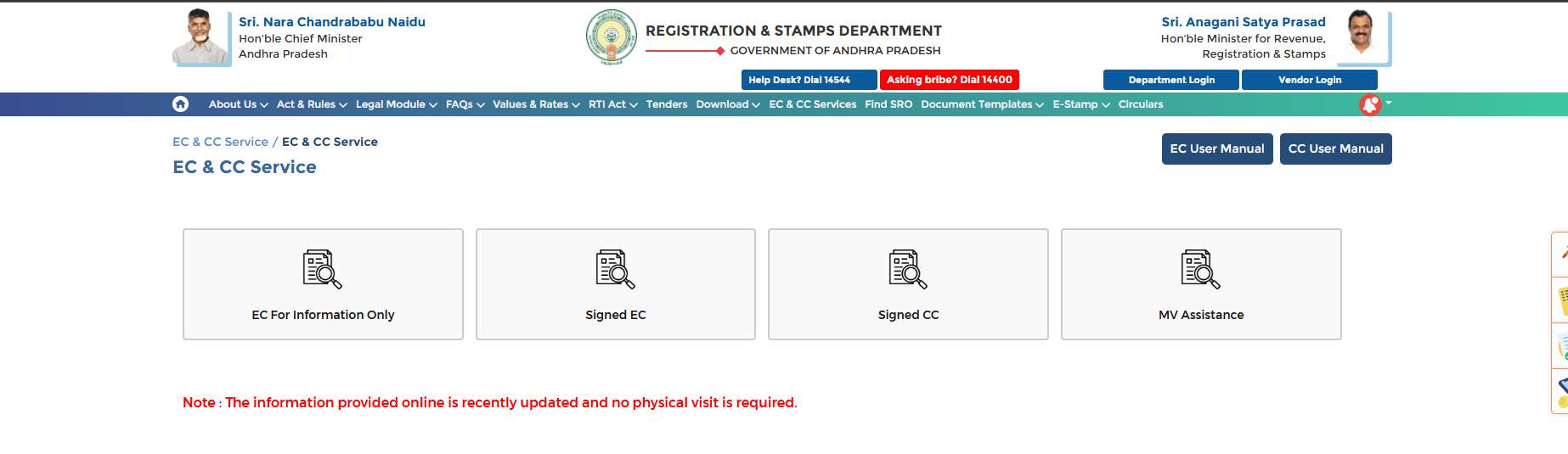
EC and CC Services is available in the top navigation bar on registration.ap.gov.in. Clicking it takes you directly to the EC and CC Service landing page which shows four service options: EC For Information Only, Signed EC, Signed CC, and MV Assistance.
EC For Information Only is a free unsigned EC that you can view and print for personal reference without login. Signed EC is an official digitally signed certificate issued through the CARD PRIMME portal, which is accepted by banks and courts for legal purposes.
Market Value is the minimum government approved price per square yard or square meter for land in Andhra Pradesh. Stamp duty during property registration is calculated based on this value or the actual sale price, whichever is higher.
Go to cardprimme.rs.ap.gov.in/PDE/ECLoginPage. Select your login type such as Email ID, Mobile Number, or Aadhaar Number. Enter your credentials and click Get OTP. After OTP verification you can apply for the signed EC by entering property details and paying the required fee.
Yes. The IGRS AP portal allows complete EC search, view and download online without visiting any government office. The free EC For Information Only service is available 24 hours on registration.ap.gov.in without any login requirement.