Check whether a property is restricted before you buy, sell, or register it
The IGRS AP Prohibited Properties List helps citizens verify whether a property appears under restrictions maintained by the Andhra Pradesh Registration and Stamps Department. It is a useful pre-check for land purchases, plot registrations, and property due diligence.
What is the IGRS AP Prohibited Properties List?
It is a public property reference list used to identify parcels or buildings that may carry legal or administrative restrictions. In practice, this helps people avoid buying land that is already involved in disputes, acquisition issues, court orders, or government notifications.
The portal is designed for quick verification and can be used before finalizing transactions. It is especially helpful when the buyer wants to cross-check ownership-related information against the available official records.
Always confirm the latest status from the official Andhra Pradesh registration portal before making any property transaction.
How to Check the Prohibited Properties List Online
Follow these simple steps to search the property details on the official portal:
Open the official portal
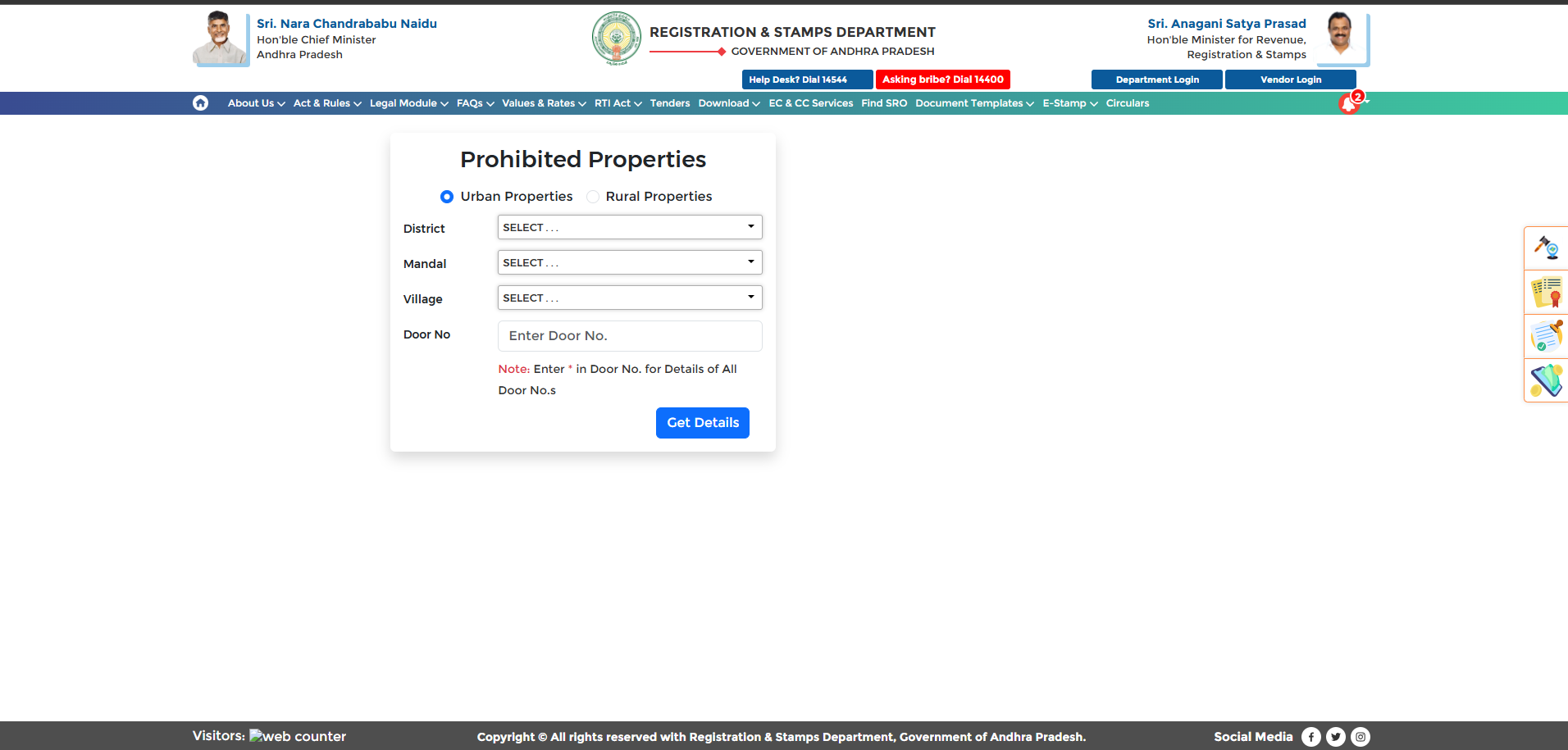
Go to the Andhra Pradesh registration website and open the prohibited properties section from the homepage or service menu.
Select the property category
Choose whether the record belongs to an urban or rural area so the portal can show the correct search path.
Pick district and mandal
Use the dropdowns to select the district and mandal where the property is located.
Choose the village
After selecting the mandal, choose the village or ward area from the list shown on the portal.
Enter survey or door number
Input the survey number, door number, or other property identifier to narrow down the result.
View the record details
The portal will show whether the property is listed as prohibited or whether it can be considered for registration.
Double-check every field before searching. Even a small spelling or number mismatch can affect the results.
Login Process for Department Users
Government or authorized department users may have an additional login path for internal access and record management.
- Open the official portal.
- Select the department login option.
- Enter the assigned username and password.
- Complete the security verification step.
- Access the dashboard for the assigned services.
Documents and Details Needed
Keep these details ready for a faster search experience:
- District name
- Mandal name
- Village or ward details
- Survey number or door number
- Ownership or registration details, if available
Who Can Use This Service?
The online service is useful for a wide range of users, including buyers, sellers, property owners, agents, and anyone who wants to verify the record before moving forward with a transaction.
- Property buyers checking risk before purchase
- Property owners reviewing the latest status
- Agents and brokers confirming record clarity
- Citizens looking for official land-related information
Benefits of Checking First
A quick verification can save time, reduce uncertainty, and help prevent avoidable legal or registration problems.
- Helps avoid disputed property purchases
- Supports better registration decisions
- Reduces the chance of fraud or hidden issues
- Makes the process faster and more transparent
Frequently Asked Questions
What does prohibited property mean?
It refers to a property that is restricted from registration or transfer because of legal or administrative reasons.
Is the online check free?
The service is generally available as a public online verification tool through the official portal.
What details are most important for search?
District, mandal, village or ward, and survey number are the most useful details for searching accurately.
Can the status change later?
Yes. Records can be updated by the relevant authorities, so the latest official result should always be checked again before a transaction.
Can I also view EC-related information?
The IGRS AP portal provides multiple property-related services, including Encumbrance Certificate-related services and registration support.
How do I remove a property from the list?
The owner needs to follow the appropriate legal or departmental process with the concerned authority to request correction or removal, if eligible.
Check Property Status Before You Proceed
Use the official Andhra Pradesh registration portal to verify prohibited properties, confirm availability, and reduce the risk of future disputes.
Open Official WebsiteDisclaimer
This page is an independent informational guide and is not affiliated with the Government of Andhra Pradesh. Please verify all final details from the official portal or the relevant authority before making any property decision.